

Customer commitments often live in Slack: a launch date agreed in a shared channel, a blocker raised in a reply, or a handover discussed by your account team. Bring those conversations into Cust so they are easy to find alongside the company's emails and calls.
Link the customer's channel and your internal account channel to the same company. Cust keeps messages, replies, and reactions together, with a link back to Slack when you need to continue the conversation.
Connect customer-facing and internal channels to the same account. Give your team the context from both sides of the relationship.
Read messages, thread replies, and reactions on the company timeline. Open the original Slack conversation whenever you need to follow up.
Ask the Cust Assistant what a customer agreed, which blockers came up, or what needs a follow-up, using the imported conversations as context.
Your team works with Northstar Labs in #northstar-labs and coordinates privately in #northstar-labs-internal. Both channels belong to the same company in Cust.
See the customer's decisions and your team's follow-ups together. Repeat the same pattern across your portfolio, linking several channels to each company as needed.
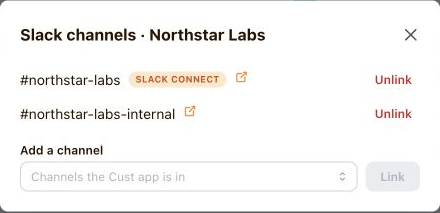
An admin connects your Slack workspace in Cust and invites the Cust app to the channels you want to bring into the account view.
Choose a company for each channel. Link both customer and internal channels to the same account, and keep control over which channels sync.
Cust imports the last 30 days of available history for new channel links, then brings in new conversations and supported updates as they happen.
See how customer conversations fit into your team's work in Cust, or follow the guide to connect your workspace.
Need help? Contact us at [email protected]